AI Media Studio for OpenCart
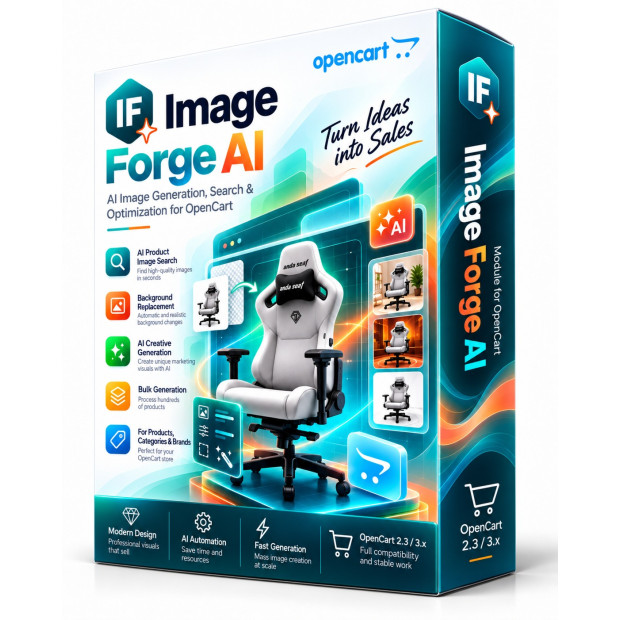
Image Forge AI — Product Image Generation and Optimization for OpenCart
Professional AI-powered image generation, search, optimization and product media management for OpenCart
Image Forge AI brings product image search, generation, background editing and file optimization into OpenCart. Preview the results and use them in product galleries without repeatedly moving files between separate services.
Instead of using multiple external services, downloading files to your computer and repeatedly uploading them back to OpenCart, you can work directly with a specific product, its images and AI tools from one interface.
Turn ordinary supplier photographs into professional catalog images, lifestyle scenes, packshots and advertising creatives, optimize them for the web and assign finished results directly to your products.
✦ AI Generation ✦ Background Removal ✦ Lifestyle Scenes ✦ Packshot ✦ WebP Optimization
New Generation Workflow
More Than an AI Image Generator
Image Forge AI is a complete workspace for product visual content. Its capabilities go far beyond generating an image from a simple text prompt.
The module works directly with your OpenCart catalog. Select a product, view its current gallery, find additional images, process them with AI and save the finished result directly back to the product.
For stores with hundreds or thousands of products, reducing even a few repetitive operations per product can save many hours of content-management work.
✦
One Module — Complete Workflow
No more switching between search engines, image editors, WebP converters, AI websites, FTP and the OpenCart product editor.
Search → Process → AI → Optimize → Gallery → Publish
Product Content Matters
Better Product Images Help Sell Products
Customers usually see a product image before reading its specifications, description or delivery conditions. Visual quality therefore plays an important role in the first impression of both your store and the product itself.
Even a high-quality product may appear less attractive when its photograph has a poor background, inconsistent proportions, low resolution or a completely different visual style from the rest of the catalog.
Image Forge AI helps create a more consistent and professional catalog and prepare visual content for product pages, categories, marketplaces, advertising campaigns and social media.
Image Forge Toolkit
Everything You Need for a Modern Product Catalog
Search, gallery management, AI creation and optimization work as parts of one connected workflow rather than separate unrelated tools.
⌕
Smart Image Search
Search for product photographs by product name, category, manufacturer or specific website and quickly find suitable visual material.
▣
Product Gallery
View current images, add new results and manage main and additional product images without manually working with files via FTP.
✦
AI Creative Studio
Turn ordinary product photos into lifestyle scenes, clean packshots, promotional visuals and professional advertising compositions.
↗
Image Optimization
Work with WebP, JPEG and PNG, resize images and control quality to prepare product media for faster web delivery.
✦ AI SCENE STUDIO
Turn an Ordinary Product Photo Into Professional Advertising Content
Many suppliers provide basic technical photographs or product images on a plain background. These images identify the product, but they may not communicate atmosphere, premium presentation or a real usage scenario.
Image Forge AI can use the original photograph as a foundation for new visual content, allowing you to create different presentation styles while keeping the product at the center of the composition.
LIFESTYLE
Lifestyle Scenes
Show products in realistic interiors, environments or usage situations so customers can better imagine them in real life.
PACKSHOT
Professional Packshots
Create clean studio-style product images suitable for catalogs, product pages and marketplace listings.
BACKGROUND
Background Processing
Remove unwanted backgrounds or create new visual environments that better match your product or brand.
ADS
Advertising Creatives
Prepare eye-catching images for banners, promotions, social media and digital advertising.
Traditional Workflow
Many Manual Steps
Search for an image, download it, open a graphics editor, resize it, remove the background, convert the file, upload it back to the server and finally assign it to a product.
Search → Download → Editor → WebP → FTP → OpenCart
Image Forge AI Workflow
One Controlled Process
Select a product, use an existing image or search for a new one, process it with the required AI or optimization tools and save the result.
Product → Image Forge AI → Ready Image
Smart Optimization
Website Performance Starts With Optimized Images
Large product photographs can significantly increase page weight. This is particularly important for mobile visitors and customers using slower connections.
Image Forge AI gives you control over format, dimensions and image quality so you can find the right balance between visual clarity and file size.
WebP / JPEG / PNG
Convert images into the required format.
Resize
Control width and height.
Compression
Balance image quality and file size.
Crop
Prepare the required composition.
Canvas
Fit images into a selected format.
Original Backup
Keep the original source image.
Smart Image Search
Find Product Images Without Endless Browser Tabs
When a catalog contains thousands of products, finding suitable photographs can become a major daily task. Administrators often need to search Google, manufacturer websites and supplier pages manually.
Image Forge AI brings image search closer to the product itself and allows you to work with visual content in the context of a specific catalog item.
Product Name Category Manufacturer Specific Website Orientation Format
Catalog Workflow
Designed for More Than One Product
When an online store contains thousands of products, manual image processing quickly becomes a serious operational task. Image Forge AI is designed for systematic work with a catalog rather than only occasional photo editing.
A structured workflow makes it easier to gradually bring product images to one visual standard and reduce the amount of repetitive work required from content managers.
Simple Workflow
From Product to Finished Image
The workflow is designed to remain understandable even for users who are not professional designers or graphics specialists.
1
Select a Product
Find the required item in your OpenCart catalog.
2
Select an Image
Use an existing photo or find a new one.
3
Run AI
Create the required scene, background or visual treatment.
4
Save the Result
Assign the finished image directly to the product.
Who Needs It
Who Is Image Forge AI Designed For?
Image Forge AI is suitable for small stores where the owner manages product content personally, as well as larger businesses with dedicated catalog and content teams.
It is particularly useful for stores that regularly receive new products from suppliers, work with marketplaces or need to maintain a professional and consistent visual catalog.
✓ OpenCart Stores
✓ Content Managers
✓ Large Catalogs
✓ Marketplace Sellers
✓ Digital Teams
✓ Online Store Owners
Use Cases
What Can You Do With Image Forge AI?
Use the module for everyday content-management tasks or as part of a larger project to modernize the visual presentation of your entire product catalog.
✓ Prepare product page images
✓ Generate new AI images
✓ Unify catalog visual style
✓ Remove unwanted backgrounds
✓ Create lifestyle scenes
✓ Create professional packshots
✓ Optimize large image files
✓ Convert JPEG / PNG to WebP
✓ Create advertising creatives
✓ Prepare marketplace images
✓ Manage product galleries
✓ Speed up catalog creation
Why Image Forge AI
What Makes Image Forge AI Different?
Its main advantage is not one individual AI feature. The real value comes from combining the entire image workflow directly with the OpenCart catalog.
Unified Ecosystem
Search, AI, optimization and gallery management work together.
Built for OpenCart
Work directly with products rather than a separate external editor.
AI Around the Product
Processing starts from the actual product and its existing visual content.
Ready to Publish
Finished results can be assigned directly to the product gallery.
AI Technologies
Modern AI and Image Search Technologies
Image Forge AI can work with external technologies for image generation, image analysis, background processing and product image search.
This makes it possible to combine specialized services for different tasks while keeping the workflow inside your OpenCart catalog management process.
OpenAI GPT Image BRIA AI Image Search
Compatibility
Image Forge AI Compatibility
Image Forge AI is designed for the OpenCart ecosystem and works with the key image formats required by modern online stores.
OpenCart / ocStore
Versions 2.3 and 3.x
Image Formats
JPEG · PNG · WebP
AI Integration
External AI / API services
OpenCart Catalog
Products and image galleries
Important: external AI and API services may require their own API keys and may have separate usage fees according to the pricing policies of their providers. Third-party API costs are not included in the Image Forge AI license price.
IMAGE FORGE AI
Give Your OpenCart Catalog a More Professional Visual Style
Image Forge AI turns scattered manual image processing into one modern workflow for product visual content.
Less repetitive work. More high-quality product images. AI generation, optimization, image search and gallery management — directly inside OpenCart.
AI Generation Creative Studio Optimization OpenCart