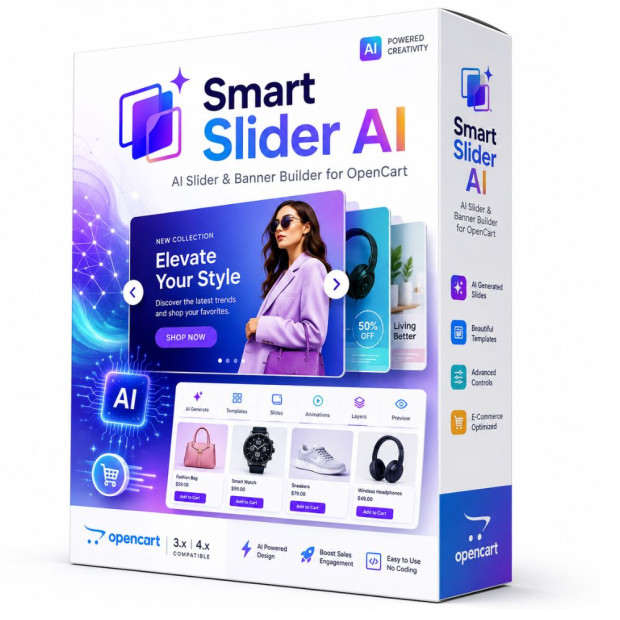
AI Slider Builder for OpenCart
Smart Slider AI — Responsive Slider Builder for OpenCart
Professional AI-powered builder for responsive sliders, promotional banners, and product campaigns in OpenCart
Smart Slider AI is a responsive banner and slider builder for OpenCart with a visual editor and AI Studio. Combine catalog products, text and buttons, then adjust the composition for desktop and mobile devices.
Instead of uploading one finished static image, you get a complete environment for building promotional compositions. Backgrounds, product images, headlines, descriptions, prices, buttons, and other elements can be managed independently, moved, resized, and adapted to match the visual style of your store.
Smart Slider AI helps you launch promotions faster, present new products, create seasonal campaigns, and build modern Hero Sliders that look professional on desktops, tablets, and smartphones.
✦ AI Studio ✦ Visual Editor ✦ OpenCart Products ✦ Desktop + Mobile ✦ Animations ✦ Multilanguage
Next Generation Slider
More than a standard slider
A traditional banner is a finished image that is difficult to update without returning to a designer. Even a small price, product, headline, or CTA change may require the entire banner to be recreated.
Smart Slider AI changes this workflow. Each part of the promotional slide becomes an independent element that can be managed directly inside OpenCart.
This makes it much easier to adapt advertising campaigns to new products, seasonal changes, sales, special offers, or any other marketing task.
✦
One module — complete workflow
Idea, product, AI, composition, mobile adaptation, animation, and publishing work as one connected process.
Product → AI → Design → Mobile → Animation → Publish
First Impression Matters
Your main slider shapes the first impression of your store
The main promotional slider often occupies one of the most visible areas of the homepage. It immediately shows current promotions, new arrivals, key products, and the most important marketing message.
If a banner looks outdated, uses tiny text, or does not adapt properly to smartphones, even a strong offer may fail to attract attention.
Smart Slider AI helps turn promotional content into a natural part of the store design rather than simply a rotating set of images.
Smart Slider Toolkit
Everything you need for professional promotional slides
AI, products, visual editing, animations, and responsive layouts work together so that creating a modern slider remains simple even without coding experience.
✦
AI Studio
Use AI to prepare the visual foundation of a promotional slide and move faster from an idea to a finished composition.
▦
Visual Editor
Position headlines, buttons, images, and other elements directly on the slide canvas and manage their placement visually.
▣
Product Integration
Select products from the OpenCart catalog and use them for promotions, new arrivals, sales, and seasonal campaigns.
↔
Drag & Drop
Change slide order with simple drag and drop and quickly reorganize your promotional sequence.
◎
Desktop + Mobile
Build layouts with multiple devices in mind and separately optimize promotional content for mobile visitors.
◈
Modern Animations
Use Scale, Blur, Zoom, Cards, Creative, Flip, Vertical, and other effects to create modern slide transitions.
Aa
Flexible Typography
Control headline, description, price, and other text sizes to match the visual style of your store.
⌘
Buttons & CTA
Create calls to action leading to products, categories, promotions, or any other page of your OpenCart store.
文
Multilanguage
Publish different sliders for different OpenCart languages and create unique promotional messages for every audience.
✦ AI STUDIO
Move from idea to advertising composition much faster
A quality promotional slide requires the right composition, product scale, enough room for text, a suitable background, and proper balance between all visual elements.
AI Studio helps accelerate preparation of the visual foundation. The result can then be enhanced with headlines, pricing, CTA buttons, and other editable elements inside Smart Slider AI.
IDEA
Advertising concept
Move faster from a marketing idea to a visual result.
FORMAT
Real slider size
Specify the actual slider width in pixels for more accurate composition scaling.
PRODUCT
Product-focused design
Build promotional content around a real product from your OpenCart catalog.
CONTROL
Full control
AI prepares the foundation while the final composition remains fully editable.
OpenCart Product Integration
Turn a catalog product into the foundation of a promotional slide
The strongest advertising for an online store is directly connected with the real catalog. Smart Slider AI allows you to work with OpenCart products directly while creating a slider.
Select the required product, use its image, name, price, and other content as part of the composition, and create a promotional block for your homepage, category, or campaign page.
This workflow is especially useful for new arrivals, sales, seasonal offers, Black Friday, individual brands, and products that need fast promotion.
Responsive Design
Mobile is a separate advertising format
Simply shrinking a large desktop banner often creates problems on smartphones. Headlines become too small, buttons lose visibility, and product images may occupy the wrong part of the screen.
Smart Slider AI lets you adapt the composition for different screen sizes and create a mobile-friendly layout with the right visual priorities.
Desktop
Wide promotional composition.
Laptop
Optimized for compact screens.
Tablet
Balanced composition.
Mobile
Readability and CTA focus.
Dynamic Presentation
Animations that add movement
Transition effects help make product presentations more modern and visually engaging. Choose subtle or expressive animations depending on the overall style of your store.
Scale Blur Zoom Cards Creative Flip Vertical
Multilanguage
Different promotional content for every language
In a multilingual store, translating only a button or headline is not always enough. Different audiences may require a different product, offer, image, or complete marketing message.
Smart Slider AI allows slider publishing to be connected to the active OpenCart language so customers automatically see the correct promotional content.
Flexible Settings
Global or individual slider settings
Use shared parameters for all sliders or activate individual settings for a specific promotional block. This helps maintain a consistent visual style while still allowing unique campaigns where necessary.
Global Mode
Shared slider parameters.
Individual Mode
Unique configuration per slider.
Live Settings
Convenient visual controls.
Slider Width
Actual width in pixels.
Use Cases
What can you use Smart Slider AI for?
Use the module as your main homepage Hero Slider or create dedicated promotional blocks for categories, campaigns, brands, and product-focused landing pages.
✓ Main Hero Slider
✓ New Arrivals
✓ Sales & Discounts
✓ Category Promotions
✓ Brand Presentations
✓ Seasonal Campaigns
✓ Special Offers
✓ Informational Banners
✓ Product Promotions
✓ Landing Page Blocks
Why Smart Slider AI
What makes Smart Slider AI different?
Its main advantage is the combination of AI, products, visual editing, responsive layouts, and publishing inside one OpenCart extension.
Less manual work
You no longer need to rebuild every promotional banner from scratch.
Built for OpenCart
Promotional content works directly with the catalog of your store.
Mobile Friendly
The composition can be adapted specifically for smaller screens.
Faster campaigns
Create and launch new promotional slides significantly faster.
Compatibility
Smart Slider AI compatibility
Smart Slider AI is designed for the OpenCart ecosystem and integrates with products, languages, and the standard store layout system.
OpenCart
Catalog integration
Responsive Design
Desktop · Tablet · Mobile
Multilanguage
OpenCart language versions
AI Integration
AI Studio and external AI services
Important: certain AI features may use external API services that require their own API keys and may have separate usage fees according to the pricing of the respective service providers.
SMART SLIDER AI
Turn your OpenCart slider into a modern marketing tool
Smart Slider AI combines AI, products, visual editing, responsive layouts, animations, and multilingual publishing in one workflow.
Less repetitive work. More freedom for marketing. Modern promotional sliders directly inside OpenCart.
AI Studio Visual Editor Responsive OpenCart